The Daily to-Do List Planner as a Strategic Advantage
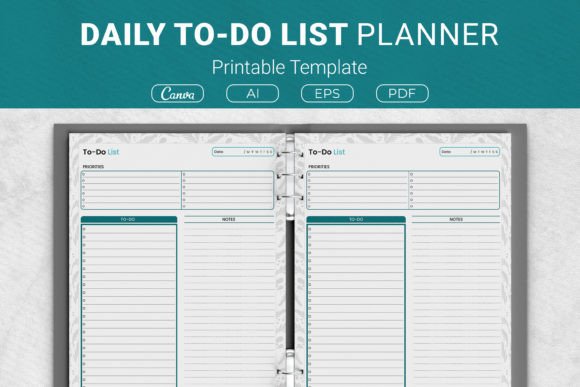
Most professionals are no strangers to mounting tasks, shifting priorities, and the quiet hum of mental load that never quite fades. A Daily to-Do List Planner promises clarity — a simple sheet of paper or a digital canvas where intentions meet action. But the market is flooded with templates, and many are used more as emotional security blankets than as genuine decision-making aids. This one, however, draws a clean line between activity and achievement. It isn’t just a list of boxes to tick; it’s a lightweight operations framework built around a few deliberate sections: top priorities, a detailed task list, and a dedicated space for notes. That structure, when used with purpose, can quietly change how you navigate your day.
We’ll explore not only what this planner contains — Ai Illustrator files, EPS, print-ready PDFs, Canva links, sizes from US Letter to compact 6×9 — but also why its design matters for entrepreneurs, creators, educators, publishers, and anyone who values sustained output over frantic busyness. The conversation is less about stationery and more about strategy.
More Than a Checklist: Understanding the Planner’s Architecture
At first glance, the Daily to-Do List Planner looks refreshingly uncomplicated. But beneath that simplicity lies an intentional sequence of prompts. The “top priorities” section isn’t just a smaller to-do list; it’s a forcing function. It asks you to separate the essential from the merely urgent before the day even begins. When a marketer plans a product launch or a course creator outlines a curriculum, this top slice becomes a pact. You commit to no more than a few critical moves, protecting your cognitive bandwidth from the dilution that comes with overcommitment.
The main to-do list holds everything else — the ongoing tasks, the follow-ups, the smaller operational threads. Then the notes area gives you a place to capture friction, ideas, or observations without polluting the task flow. These three zones, when respected, create a daily workflow that mirrors how many high performers mentally structure their time anyway. The planner simply externalizes it, reducing the mental tax of constant reprioritization.
Why Intentional Structure Outperforms Open-Ended Lists
Generic notebooks invite uncurated dumps. You write down thirteen items, feel a wave of accomplishment, and then end the day with nine unchecked boxes and a vague sense of failure. The Daily to-Do List Planner resists that pattern. Because the priorities section is visually and conceptually separate, it forces a miniature review session before any task gets recorded. This small ritual is where strategic thinking quietly takes root.
Consider a freelance developer juggling client work, professional development, and admin. Without structure, the day can default to reacting to the loudest notification. With the planner, they start by asking, “Which one or two items, if completed, would make this day genuinely productive regardless of anything else?” That question shifts the internal posture from reactive to directive. It’s a tiny governance mechanism that, over weeks, compounds into sharper decision-making and fewer evenings spent wondering where the hours went.
The planner also creates a natural bridge between daily action and longer-term goals. A blogger using it to map daily content tasks can align the priority slot with the week’s editorial theme. A small business owner can tie the top task to a quarterly growth lever. The tool itself doesn’t do the strategic thinking — neither does any software — but it holds a shape that invites it. That’s a meaningful distinction.
Practical Integration Without Overcomplication
One underrated risk in productivity tools is the temptation to over-engineer. Some systems become so elaborate that maintaining them consumes a measurable slice of your creative energy. This planner’s strength lies in its restraint. It doesn’t demand color coding, tagging, or time blocking unless you choose to add those layers. It meets you where you are: print a copy at home for a binder, use the Canva link to adapt it visually, or incorporate it into a KDP interior for a published planner product. That adaptability matters because different contexts require different levels of polish, and the files provided — Ai, EPS, PDF, Canva — cover a spectrum from quick-and-personal to print-ready professional.
For an educator managing multiple classes, the resource can live inside a physical binder, becoming a daily anchor sheet. For a digital marketer who prefers screen-based workflows, the Canva template becomes a customizable touchpoint that can be pulled up on a tablet alongside other tools. The point isn’t the medium; it’s the consistency of the mental model the planner reinforces. You see the top priorities. You note the trade-offs. You use the notes section to capture insights that might otherwise evaporate. The ritual remains stable regardless of whether the paper size is US Letter, A4, or a compact 7.5x9.25 inches — because the cognitive structure stays intact.
When the Planner Shines: Real-World Scenarios
Imagine a content creator with a day packed with recording, editing, social engagement, and business development. Starting the morning by populating the Daily to-Do List Planner with a single priority — say, finalize the script for the next video — changes the entire trajectory. The priority section holds that north star. The task list captures the smaller, still-necessary actions: replying to comments, checking analytics, ordering supplies. The notes area becomes a parking lot for creative ideas that surface mid-task but shouldn’t derail the primary objective. By the evening, progress feels tangible because the main creative or intellectual output was protected.
Now flip to a publisher or a Kindle Direct Publishing author preparing planner interiors for sale. Here, the planner isn’t just a personal tool; it’s a product component. The included Ai and EPS files allow full design control, while the PDFs are ready for immediate use or testing. The multiple size options — from the standard 8.5x11 inch to the travel-friendly 6x9 inch — extend the lifespan of the design across different product lines. But even in this commercial context, understanding the strategic design of the planner itself helps the publisher make better decisions about layout, margin, and usability. They aren’t just selling a piece of paper; they’re selling a daily decision framework. That insight influences everything from cover design to marketing copy.
Using It to Shape Better Decisions, Not Just Longer Lists
A well-constructed to-do list can be a decision journal in disguise. When you revisit the planner at the end of a week, patterns become visible. Which tasks kept appearing in the priority section but never moved? Which ones were completed but felt empty? The notes section, often overlooked, turns into a small archive of friction points: “Client paused project,” “Too many small interruptions,” “Spent too long on email.” That raw data, collected without judgment, becomes input for strategic adjustments.
For a small business owner, this might reveal that the daily priority was consistently operational firefighting rather than relationship building or product innovation. That’s not a failure of the planner; that’s a signal to restructure the day or delegate differently. The Daily to-Do List Planner doesn’t just organize tasks — it surfaces misalignments between intention and reality. When used with that meta-awareness, it becomes a diagnostic tool, not just a production tool.
Also worth noting: the planner supports what many cognitive scientists call “environmental scaffolding.” By having a fixed, simple location for priorities and notes, you reduce the constant context-switching that fragments attention. The brain learns that this piece of paper (or this digital page) is where daily commitments live. That slight reduction in cognitive load can be disproportionately valuable during weeks of high-intensity work — product launches, course completions, seasonal business rushes.
Potential Pitfalls and How to Navigate Them
No tool, however well-designed, is immune to misuse. A common misstep is treating the priority section as a glorified wish list rather than a binding constraint. Writing down five “top priorities” defeats the purpose. The section’s power comes from scarcity. If everything is a priority, nothing is. A strong practice is to limit that zone to two, maybe three items — and to treat failure to complete them not as a personal shortcoming but as a signal that the day’s structure needs revisiting.
Another risk: using the planner as an emotional crutch to avoid deeper strategic thinking. Filling out the Daily to-Do List Planner can feel productive, but if the tasks themselves are disconnected from a meaningful goal, you’re efficiently climbing a ladder leaning against the wrong wall. Before the daily sheet comes out, a broader question should be asked periodically: “What am I building toward, and do today’s priorities move that forward?” The planner supports that alignment but doesn’t create it by itself.
There’s also the temptation to over-customize too early. With Canva templates and Illustrator files at your disposal, it’s easy to spend hours tweaking fonts and colors instead of using the planner to do actual work. For personal use, start with the print-ready PDF. Live inside the template for a few weeks before deciding what really needs to change. That disciplined approach saves creative energy for the tasks that matter.
Versatile Formats and Long-Term Adaptability
The package’s inclusion of multiple file formats — Ai, EPS, PDF, Canva link — is more than a convenience. It’s a hedge against changing needs. A freelancer might start with the printed US Letter version tucked into a day planner. Later, as they build a coaching side business, they can adapt the design into a branded client tool using the vector files. A KDP seller can take the same interior and test different cover designs across trim sizes without rebuilding the layout each time. That kind of versatility extends the planner’s useful life beyond a single season or project.
The size options also matter strategically. The 8.5x11 inch format feels appropriate for desk-bound, deep-focus planning, while the 6x9 inch version travels easily in a bag for on-the-go professionals who might need to recalibrate priorities between meetings. The 7.5x9.25 inch size occupies a middle ground — substantial enough for detailed daily breakdowns but still portable. These aren’t arbitrary variations; they let you match the physical experience of planning to your work rhythm.
Building a Sustainable Daily Practice
Consistency with the Daily to-Do List Planner depends on making the habit frictionless. Keep printed sheets or a digital template within immediate reach at the start of each work session. Fill in the priority section first, then the task list, and leave the notes area empty — it’s for capture, not pre-planning. At the day’s end, spend two minutes reviewing and jotting down any lingering observations. That micro-review fuels the next day’s priority setting and prevents the slow drift into undirected busyness.
For teams or collaborative projects, the planner can serve as a personal alignment tool even if the group uses shared software. A project manager might run a digital Kanban board while privately using the planner to define their own daily leverage points. The result is a leader who shows up prepared rather than merely reacting to the board’s noise. This dual-layer approach — public tool for coordination, personal planner for focus — is often where the biggest productivity gains hide.
The notes section deserves special attention. Use it to record not just reminders but context: why a task felt harder than expected, what external factors influenced the day, a useful phrase from a client call that might inform future messaging. Over time, these notes become a record of professional growth and situational awareness. A marketing strategist scanning a few weeks of notes might spot a recurring theme: content gets delayed when review cycles aren’t clearly defined. That’s not a to-do item; it’s a process problem. The planner surfaces that signal.
Strategic Observations for Long-Term Results
Products like the Daily to-Do List Planner often get lumped into the productivity category and dismissed as simple commodities. But the difference between a generic sheet of paper and this structured template is the difference between a blank road and a lane with gentle guardrails. You can still steer wherever you like, but the guardrails keep you from drifting into the ditch of trivial tasks.
For those building a personal brand, a coaching practice, or a creative portfolio, the discipline of daily prioritization is a quiet differentiator. It’s not flashy, but it is durable. Long-term results are rarely the product of isolated heroic efforts; they’re the accumulation of many well-chosen daily actions. The planner doesn’t guarantee those choices, but it makes them easier to see and harder to neglect.
Finally, whether you’re using this as a personal productivity layer, a content creator’s daily guide, or a re-purposable interior for a published planner, the underlying principle remains: structure frees attention. The Daily to-Do List Planner, with its priority section, task list, and note space, is a minimal viable system for turning intention into progress. Treat it as a partner in decision-making, not just a place to store tasks, and it will quietly repay the effort.