Mastering Task Management with a Priority Matrix Planner Template
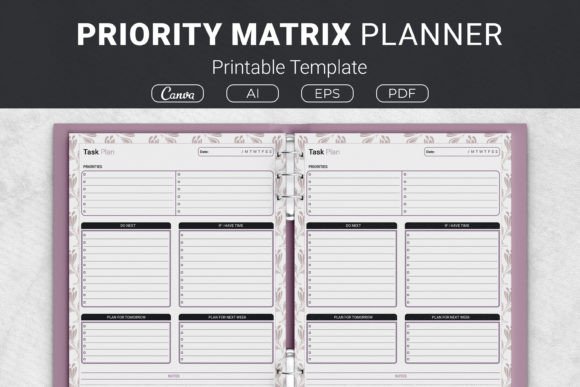
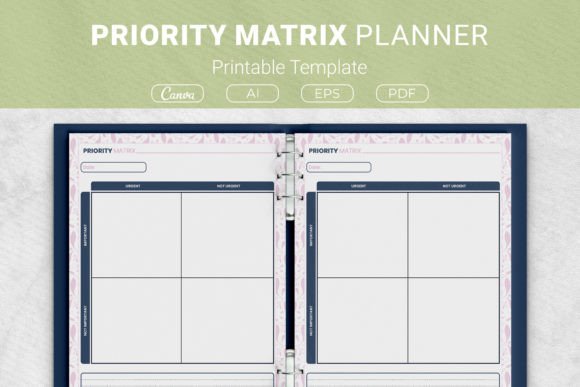
The gap between a cluttered mind and a clear action plan often comes down to one thing: how well you separate what matters from what merely makes noise. A Priority Matrix Planner Template turns that separation into a visual, repeatable habit. It is not just another checklist; it is a decision-making framework that forces you to evaluate urgency and importance before you commit to any task. Using a 2×2 grid with Urgent and Important axes, the template sorts every obligation into one of four quadrants. That simple act of sorting removes the paralysis of a long to-do list and replaces it with immediate clarity.
Understanding the Four Quadrant Logic
The power of the Priority Matrix lies in its constraints. By forcing a binary choice on two dimensions, it preempts the natural human tendency to treat everything as equally critical. The top-left quadrant holds tasks that are both urgent and important. These are the fires—the client deadline missed if you wait, the server outage taking down a live site, the presentation due in three hours. They need your full attention now. The top-right quadrant contains tasks that are important but not urgent. These represent strategic growth: writing a book outline, revamping your sales funnel, exercising, planning quarterly goals. Scheduling these prevents future firefighting. The bottom-left quadrant captures the urgent but not important—requests from others that feel pressing but do not move your own metrics. Delegation or a polite, firm refusal fits here. The bottom-right quadrant is for the neither urgent nor important; these are the time leaks. Deleting an email list, organizing decade-old files, or mindlessly scrolling fall into this box. The template encourages elimination, freeing mental energy for what actually creates outcomes.
Setting Up the Template for Your Workflow
Before you fill in a single quadrant, take ten minutes to define your scale. For a freelancer, “important” might mean activities that generate income file or build reputation. For a marketing manager, it could mean actions aligned with quarterly KPIs. Write your definitions lightly on the page or on a sticky note until they become internalized. Then gather your task source—a digital task manager, a notebook brain dump, or even a stack of sticky notes—and start placing items into the four boxes. Resist the urge to soften labels; if you would not cancel a family dinner for it, it likely is not urgent. If it does not connect to a larger goal, it is not important in the professional sense. This upfront clarity makes the template more than a piece of paper; it becomes a compass.
Many professionals use the printable at two distinct moments. First, during a weekly review, they dump all open loops into the grid. This sets the strategic direction for the upcoming days. Second, they revisit a fresh copy each morning as a rapid prioritization exercise, pulling no more than three items from the organized quadrants onto a daily focus list. Because the Priority Matrix Planner Template comes in multiple sizes like US Letter (8.5 x 11 inches) and A4 (210 x 297 mm), you can print it on standard paper and slip it into a binder or desk planner, keeping it visible as a constant reference point.
Printing, Binding, and Maintaining a Tactile System
There is a distinct cognitive advantage to paper-based planning when you need to step away from screens and reduce notification fatigue. The template package includes AI Illustrator files, an EPS file, and ready-to-print PDFs, giving you full control over the output. You can open the AI file to tweak line weights, add your branding, or change quadrant labels to match your internal jargon—such as “Do Now,” “Schedule,” “Delegate,” “Eliminate.” The PDF files are pre-formatted for instant printing, so you can keep a stack near your desk or in a family command center.
For those using a discbound or binder system, the 7.5 x 9.25 inch and 6×9 inch options open up portable planning. The smaller format fits into a purse or a fieldwork bag, making it practical for site visits, back-to-back client meetings, or creative sessions at a coffee shop. If you prefer a cleanly bound planner, consider using the template as a KDP planner interior for Kindle Direct Publishing projects. Since the files are print-ready and include open-source AI files, you can integrate them into your own low-content book without layout guesswork. This turns a personal productivity tool into a commercial asset for publishers, coaches, and content creators who want to offer a high-quality priority matrix to their audience.
Content Creators and Freelancers
A YouTube creator might look at a dozen potential video topics. Without a filter, all feel urgent because the algorithm demands consistency. The matrix forces a deeper question: which topic aligns with my channel’s long-term niche and has the highest search volume without requiring a time investment that jeopardizes sponsored content deadlines? The important-but-not-urgent quadrant captures video research and scriptwriting scheduled for the following week, while editing a sponsorship-flagged video lands in urgent and important. Replying to non-critical collaboration emails lands in urgent but not important, ripe for a batch response session or a virtual assistant. This prevents the creator from becoming a reactive content processor and instead a strategic media builder.
Educators and Academic Planners
Teachers juggle lesson planning, grading, administrative paperwork, and student emotional support. Using the template during a planning period can quickly compress the chaos. Grading for a class happening in two hours is urgent and important. Reformatting a lesson template for next semester is important but not urgent; it gets a time block on Saturday morning. Responding to an all-staff email chain about a non-urgent supplies request is a classic delegate or delay candidate. The physical act of crossing out items in the elimination quadrant—like reorganizing a shelf that functions just fine—provides a psychological release that digital apps rarely replicate.
Small Business Owners and Publishers
If you run a low-content publishing business, the Priority Matrix Planner Template serves a dual role. It helps you manage your own launch calendar, and the file package becomes a product you can customize and sell. Using a Canva template link provided in the package, you can adjust colors to match a seasonal theme, swap the font to match a broader planner collection, or add a brand logo. The EPS file ensures compatibility with professional design workflows. As you prepare a quarterly KDP release, you can apply the matrix to your own tasks: designing a cover (urgent and important for a launch next week), researching trending keywords for Q3 (important but not urgent), and deleting outdated mockup files that clutter your drive (not urgent, not important). This metal-ayer reality keeps the tool authentic; you are using the exact system you might sell or recommend.
Bridging the Analog and Digital Divide
Paper is excellent for thinking, but digital tools are unbeatable for recurring reminders and capturing tasks on the go. A practical integration path is to use a digital inbox—like Todoist, Notion, or even a voice memo app—as a capture point during the day. Then, during a dedicated planning session, transfer uncategorized items onto the printed matrix. Once the grid is filled, you can decide what to digitize next: only the tasks labeled “urgent and important” or “important but not urgent” make it into your digital calendar or project management board. This hybrid method preserves the deep thinking that paper enables while keeping you connected to notifications you cannot ignore. The Priority Matrix Planner Template acts as a bridge, not a replacement for your existing stack.
Another cross-tool strategy is to photograph your completed matrix and embed it in a digital daily note. Apps like Evernote, OneNote, or even a pinned Slack message to yourself can hold the image. This allows you to reference your priority decisions when you step into a coworking space without carrying the binder. The template’s clean 2×2 grid is inherently scannable, so a quick glance at your phone shows exactly what deserved your next hour of focus.
Long-Term Consistency and Quality Control
A productivity tool only works if you trust that you will use it consistently. One reason the paper matrix often outperforms app-only solutions is that it creates a ritual. The deliberate choice to print, the physical act of writing, and the manual crossing-out of completed items engage a different part of the brain. To maintain that habit, store a master PDF and print a batch of 12 sheets at a time—enough for a quarter. Punch them for a binder, or fold a 6×9 copy into your journal. Pair the template with a simple weekly alarm that says “Matrix Review.” Even on chaotic weeks when the grid cannot guide every hour, the review itself builds self-trust. Over time, your ability to instinctively recognize pseudo-urgency sharpens, reducing the number of items that even reach your desk.
The template’s open-source AI Illustrator files also encourage quality control at the design level. If you find the default quadrant labels limiting, you can fork the file and create role-specific variants: a matrix for financial decision-making, one for family event planning, or even a version for creative ideation where axes become “Original vs. Derivative” and “High Effort vs. Low Effort.” The underlying structure remains the same, but the application evolves with your workflow.
Integrating the Matrix into a Broader Productivity System
No single tool should carry the weight of an entire productivity system. The Priority Matrix Planner Template shines when it sits alongside a goal-setting framework like OKRs, a habit tracker, and a time-blocking calendar. During annual or quarterly planning, you define high-level objectives. Those objectives populate the “important but not urgent” quadrant. Weekly, you break them into actionable steps and move them into the scheduled zone. Daily, the urgent and important quadrant captures the execution. This cascading flow prevents long-term goals from being permanently stuck in “someday maybe” and forces them onto the page where they can become concrete actions.
For team settings, print large-format A4 copies and run a collaborative quadrant session on a whiteboard before translating decisions into a shared project tool. A marketing team might use it to decide which campaign ideas to pursue now, which to schedule for the next quarter, which to hand off to interns, and which to archive. The template becomes a communication artifact that aligns everyone around the same definitions of urgency and importance, reducing disagreements about priorities later.
Adapting the Template for Personal Routines and Home Management
Beyond the office, the matrix proves useful in household and personal administration. When decluttering a garage or planning a family week, you can quickly distinguish between tasks like renewing a passport that is about to expire (urgent and important) and researching a new car model that interests you but is not needed for another year (important but not urgent). The 7.5 x 9.25 inch size works well attached to a refrigerator or a command center bulletin board. Because the template is intentionally sparse, family members with no project management training can still engage with it. This simplification reduces mental load and surfaces hidden items that cause chronic stress—often because they have been floating in the “important but not urgent” zone for months without a specific date.
Maximizing the Value of the Included File Formats
The package’s diversity of file types is not just about convenience; it directly supports varied implementation styles. The AI Illustrator and EPS files give graphic designers and KDP publishers total creative freedom. You can resize the grid to fit a custom journal cover, embed it into a larger planner, or convert it to a transparent PNG for digital planners used on tablets. The PDF files are set for instant, high-resolution printing, ensuring that no matter how you reproduce the template—home inkjet, laser printer, or a professional print shop—the line art remains crisp. And the Canva template link removes the learning curve for non-designers. In a few clicks, you can add color coding for each quadrant (red for do now, blue for schedule, green for delegate, gray for eliminate) to create a visually intuitive system that works at a glance.
As you customize, keep the grid proportions stable to preserve the psychological effect. The equal quadrant size implicitly communicates that each type of task deserves a distinct treatment, but they all fit on one page. This one-page constraint is intentional; it caps analysis and prevents you from listing twenty things in the “urgent and important” box, forcing a more honest evaluation.