Priority Matrix Planner: A Practical Tool for Task Management
Staying on top of tasks and projects often comes down to a clear system. Many people turn to digital apps for organization, yet there is a growing appreciation for printable tools that give a tactile, distraction-free way to plan. The Priority Matrix Planner is one such resource, designed to help individuals and professionals sort their workload by urgency and importance. This evaluation looks at what the planner offers, who may benefit most from it, and when alternative methods might make more sense.
Understanding the Priority Matrix Approach
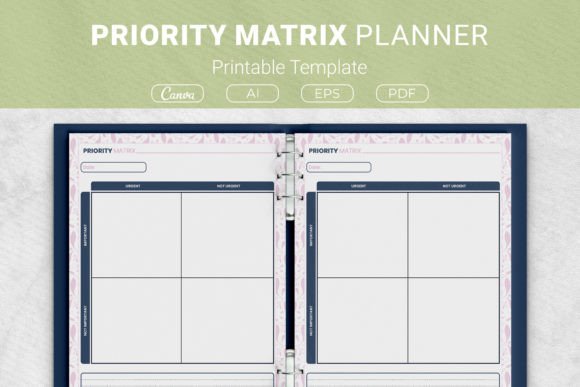
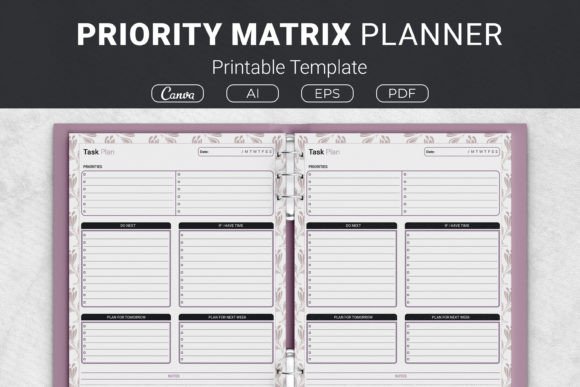
A priority matrix, sometimes called the Eisenhower Matrix, divides tasks into four quadrants based on two factors: urgency and importance. The top-left quadrant captures tasks that are both urgent and important—these demand immediate attention. The top-right holds items that are important but not urgent, which often relate to long-term goals and strategic growth. The lower quadrants cover tasks that feel pressing yet lack real significance, along with those that offer little value at all. This four-part structure makes it easier to see where time actually goes and where it should go instead.
The Priority Matrix Planner takes this concept out of the abstract and places it onto a printable page. Instead of learning a new piece of software or flipping between app screens, users can write down their tasks directly, physically sorting them into the relevant boxes. The act of handwriting often reinforces clarity and commitment, which some digital tools struggle to replicate.
What the Printable Template Package Includes
One of the more practical aspects of this product is the variety of file formats and sizes included. The package comes with AI Illustrator files, an EPS file, ready-to-print PDFs, and a link to Canva templates. This range supports different user preferences. Someone who simply wants to print and go can use the PDF. A designer crafting a KDP interior for Kindle Direct Publishing can work with the open-source Illustrator files. The Canva link offers a middle ground for those who like to adjust colors or fonts before printing.
Size options cover US Letter, A4, 7.5 x 9.25 inches, and 6 x 9 inches. This flexibility matters because planners serve different purposes. A US Letter sheet might slip into a standard binder, while the smaller 6x9 size could suit a compact personal journal. Having multiple dimensions reduces the need to resize or reformat the template manually.
Reasons Someone Might Be Interested
People search for printable planners for a range of reasons. Some feel overwhelmed by digital notifications and want a paper-based method that does not buzz or blink. Others find that physically crossing off a completed task delivers a sense of progress that tapping a checkbox cannot match. The Priority Matrix Planner appeals to those who like structured thinking without the learning curve of a new app.
There is also a creative angle. Self-publishers on platforms like Amazon KDP look for interiors that are visually clean and easy to adapt. Because the package includes editable files and a Canva template, it fits into a low-content publishing workflow. A coach or consultant might download the template, customize it with their branding, and offer it as a client resource.
Benefits Worth Considering
- Clarity through categorization. Forcing tasks into quadrants reveals which activities truly drive results and which ones merely fill time.
- Reduced decision fatigue. When the matrix is filled out, the question shifts from "What should I do next?" to simply following the priority order already established on paper.
- Tangible progress tracking. A physical sheet shows completed items at a glance, and the act of writing can improve memory retention for key tasks.
- Adaptable to different workflows. The template does not prescribe a specific system beyond the matrix itself. Users can combine it with time blocking, Pomodoro sessions, or weekly reviews.
- Low cost and reusable. Print as many copies as needed without recurring subscription fees.
Tradeoffs and Practical Limitations
No single planning tool fits every situation, and the printable matrix has its constraints. A paper sheet cannot send reminders, sync across devices, or reorder tasks automatically. If a project involves frequent collaboration with remote team members, a shared digital board may offer smoother coordination than a printed page sitting on one person's desk.
Portability can also be a factor. While a binder or folder keeps sheets together, someone who manages dozens of tasks daily might find that a single matrix page fills up quickly. That can lead to rewriting or carrying multiple sheets, which may feel less streamlined than a searchable task database. Additionally, the matrix method assumes tasks can be clearly labeled as urgent or important, but in real life, those lines sometimes blur. Users may need to spend a few minutes weighing where each item truly belongs, which requires honest self-assessment.
Situations Where the Priority Matrix Planner Excels
This printable template is a strong fit for individuals who enjoy analog planning and want a focused, single-purpose tool. Students managing coursework, freelancers juggling client deadlines, and small business owners balancing daily operations with long-term projects can all benefit from seeing their priorities laid out on one page. The act of physically filling out the quadrants during a morning planning session can set a deliberate tone for the day.
The product also works well for those creating low-content books for Kindle Direct Publishing. The editable files allow customization of fonts, colors, and minor layout adjustments, which supports a range of niche planner designs. Someone building a productivity journal or a time management workbook could incorporate this matrix as a repeatable interior page. The Canva link further simplifies this process for those who prefer a web-based design tool over professional illustration software.
Home organization is another fitting use case. Families planning a move, preparing for a big event, or coordinating household projects can print a matrix and fill it out together. The shared physical reference keeps everyone aligned without requiring each person to download and learn an app.
When Alternatives May Be Worth Exploring
For those who rely heavily on digital ecosystems, a printable matrix might feel like an extra step rather than a help. Project managers overseeing complex, interdependent tasks across multiple teams often need Gantt charts, Kanban boards, and real-time collaboration features that paper simply cannot provide. In these environments, tools like Notion, Trello, or Asana integrate priority labels and deadlines into a broader workflow.
People who travel frequently and prefer to pack light may find that a digital task manager on a phone is more practical than carrying a binder or folder. Similarly, if someone's task list changes drastically throughout the day—incoming client requests, shifting deadlines—an editable digital list offers the flexibility to rearrange priorities without rewriting anything.
There is also the question of consistency. A printable template requires the discipline to print, fill out, and review it regularly. Without that habit, the sheets can become clutter rather than a productivity aid. Digital tools often include built-in reminders that help maintain the routine, which can be valuable for those still building a planning habit.
Making a Thoughtful Decision
Choosing a planning method often comes down to how someone thinks and works best. The Priority Matrix Planner suits visual, hands-on planners who value simplicity and clarity. It provides a structured framework without overwhelming options. The multiple file formats and sizes add practical versatility, especially for those who want to integrate the matrix into a self-published book or a personalized binder system.
Before deciding, consider these practical questions:
- Do you retain information better when you write it by hand, or do you prefer typing and searching?
- Will your priority list change multiple times throughout the day, or does it stay relatively stable?
- Do you need to share your task status with others in real time?
- Are you looking for a standalone planning page, or do you need a tool that connects with calendars, email, and file storage?
- Are you interested in customizing and possibly publishing the template, or will it remain for personal use only?
Answers to these questions can guide whether the printable matrix aligns with daily realities. The template itself is a flexible resource, but its effectiveness depends on how consistently it is used and whether its paper format complements an existing routine.
Expectations Around Usage and Results
Using a priority matrix well takes a small investment of upfront thought. It is not enough to jot down tasks in random quadrants; the exercise works best when there is honest evaluation of what truly matters. Some users may need a few attempts before they feel confident sorting tasks accurately. That learning curve is natural and often leads to sharper decision-making over time.
The template does not automate anything, and it will not enforce accountability. The value comes from the process of sorting, committing, and reviewing. Many people find that the simple act of seeing unimportant tasks written in a low-priority quadrant makes it easier to let go of them or delegate. That clarity alone can reduce stress and free up mental energy for the work that counts.
For those considering the commercial use of the files, the open-source Illustrator and EPS formats provide a solid foundation for creating a polished product. The PDFs are print-ready, so no additional design work is required for personal or direct KDP use. The Canva template link lowers the barrier for anyone without access to vector editing software.
Weighing the Overall Fit
The Priority Matrix Planner occupies a useful space between a blank notebook page and a full-featured task management app. It offers enough structure to guide thinking without dictating a rigid system. The inclusion of multiple file types and sizes broadens its appeal, from the home user printing a single sheet to the entrepreneur packaging a productivity journal. Its limitations are inherent to any paper-based tool—no syncing, no reminders, no collaboration—but for those who prefer working offline or who find screens distracting, those limits may actually be strengths.
Ultimately, the right planning tool is the one that gets used consistently and supports clear thinking. For many, a printable matrix provides exactly that, combining a proven prioritization framework with the satisfaction of pen on paper. Evaluating how it fits into a personal workflow, rather than treating it as a universal fix, leads to the most practical outcome.