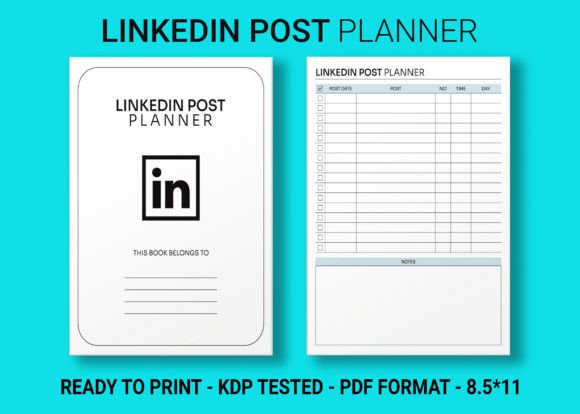
LinkedIn Post Planner KDP Interior
Every self-publisher knows the moment when a great idea for a low-content book strikes—but the thought of building a polished interior from scratch quickly drains that excitement. A LinkedIn Post Planner KDP Interior changes the game. It delivers a complete, ready-to-upload interior file so you can skip layout tweaking and blank-page anxiety and move straight to publishing a planner that feels both professional and instantly useful.
What a LinkedIn Post Planner Interior Really Gives You
This isn’t a loose collection of page ideas. It’s a structured, 120-page planner built specifically for the needs of professionals who schedule and create LinkedIn content. The interior arrives as a package of designer-grade files that remove the friction of formatting, testing margins, and worrying about print bleed.
When you open the download from a trusted provider, you get more than a PDF. You receive:
- Editable AI File — the Adobe Illustrator source, ready for full customization of headers, icons, and layouts
- PDF Files in high resolution, print-ready with no quality loss
- PNG Files in high resolution — perfect for digital adaptations, digital sticker creation, or app-based planner inserts
- 8.5 × 11 inches trim size, the classic letter format that feels spacious and serious
- 120 total pages with enough daily, weekly, and monthly planning sections to support a full quarter of content strategizing
- Intro page to set expectations and gently guide the user into the planning rhythm
- An interior tested on KDP with bleed included, so nothing gets clipped during printing
The term “bleed-ready” matters deeply. It means the design extends beyond the trim line, ensuring that colored backgrounds, headers, or edge-to-edge elements print cleanly without unwanted white slivers. This interior has already passed the KDP upload check—saving you hours of trial and error.
Why Publishers Reach for Pre-Built Planners
Time remains the most underrated currency. Designing a single page in InDesign, Illustrator, or Canva is manageable; duplicating that across 120 pages while keeping consistent spacing, margin alignment, and bleed settings takes a completely different skill set. Even experienced designers can get lost in formatting adjustments.
A LinkedIn Post Planner KDP Interior lets you focus on the parts of publishing that actually grow your business: cover design, niche positioning, keyword research, and marketing. The interior becomes your dependable backbone. Because the file is KDP-tested, you upload the PDF manuscript, confirm the page size, and Amazon’s checker typically passes it without the dreaded “margins outside printable area” warning.
For entrepreneurs who run multiple low-content product lines, this predictability turns into a reliable production workflow. You can take the same base interior, rebrand it slightly, and launch variants for different audiences—without redesigning from zero every time.
Customizing the Editable AI File for a Unique Planner
The included Adobe Illustrator file is where the real creativity begins. Even if you aren’t a professional graphic designer, small, intentional tweaks can transform a generic planner into something that feels exclusive to your target reader. Consider the following customization directions without overcomplicating the interior structure:
Adjust the Color Palette to Match a Brand Vibe
LinkedIn users range from corporate executives to creative freelancers. A soft, neutral palette with slate blues and warm greys might appeal to B2B consultants, while bright accent pops attract social media managers and personal branding coaches. In Illustrator, modifying the global swatches changes the entire file at once—no need to recolor every element individually.
Add Niche-Specific Section Headers
The planner likely includes standard headings like “Weekly Content Plan” or “Post Ideas.” You can replace them with terminology that resonates with a particular group. For example:
- For real estate agents: “Listing Stories,” “Neighborhood Market Updates,” “Open House Highlights.”
- For career coaches: “Motivation Monday,” “Client Wins,” “Industry Insights.”
- For SaaS founders: “Product-Led Content,” “Feature Spotlights,” “User Retention Angles.”
Subtle Branding Without Distraction
Placing a small logo or website URL in the footer of each page adds a gentle brand touch. Because the interior uses open, clean layouts, the addition doesn’t overpower the planning functionality. Just ensure the URL remains outside the designated writing area so users can still jot notes comfortably.
Practical Steps for a Smooth KDP Upload
Even with a KDP-tested file, going in with a checklist pays off. First, open the high-resolution PDF and scroll through every page to confirm that headers, page numbers, and lined sections sit within safe margins. The bleed-ready interior already accounts for the extra 0.125 inches needed on each side, but you should visually spot-check corners where important text appears.
Next, upload the manuscript PDF to Amazon KDP and select the trim size that matches—8.5 × 11 inches. When the online previewer appears, flip through the pages. Look closely at pages with darker graphical headers; those should extend all the way to the page edge in the preview, indicating the bleed works as designed. If you changed paper color in Illustrator, make sure that color flows into the bleed area and doesn’t cut off abruptly.
For the cover, use Amazon’s cover calculator based on the number of pages (120 pages requires a specific spine width). If you’re using a glossy or matte finish, test a printed proof before ordering bulk author copies. The KDP interior paired with a strong typographic cover can elevate the perceived value significantly.
Beyond Amazon: PNG Files as Multi-Platform Assets
An often-overlooked opportunity sits right inside the download folder: the PNG files. Because each page exists as a high-resolution PNG with a transparent background version possible (depending on the source), you can import them into apps like GoodNotes, Notability, or Xodo to create a digital LinkedIn planner. Sellers on Etsy and Gumroad actively look for digital notebooks that users can load onto tablets with stylus support.
You can also use select PNG pages as lead magnets. Offer a free “7-Page LinkedIn Content Strategy Mini-Planner” in exchange for an email address. That small preview showcases the larger book and drives traffic back to the Amazon listing. Pairing a few PNGs with a simple Canva template results in an instant opt-in resource without touching code.
For course creators and coaches, the interior’s PNG files can become part of a printable workbook inside a membership area or online program. The 8.5 × 11 size aligns perfectly with standard home printing, so clients print exactly the pages they need without formatting struggles.
Niche Ideas That Make This Planner Sell
Yes, “LinkedIn planner” as a broad keyword already has volume. But the post-sale satisfaction and the chances of positive reviews climb sharply when the interior speaks to a specific professional identity. Consider packaging the identical interior with a cover and title that focus on:
- The Executive’s LinkedIn Post Planner – emphasizing leadership storytelling and employee advocacy.
- The Freelancer’s Visibility System – a planner for those who combine proposal writing with daily LinkedIn engagement habits.
- Job Seeker’s Content Calendar – repositioning the interior for candidates who want to build a consistent expert presence while searching.
- HR & Recruitment Content Planner – with data-driven posting schedules and employer branding trackers.
Each variation answers a more immediate need than a generic catch-all. The editable AI file empowers you to tweak internal page labeling while keeping the overall architecture intact, so creating niche versions becomes a low-effort, high-reward task.
Collaborating with Creatives to Max Out Quality
Designers who aren’t comfortable editing vector files can still collaborate with a freelancer for a flat fee. Provide the AI file and a simple style guide: your chosen hex codes, preferred font families, and any custom section titles. Because the structure is already there, the revision time stays minimal. You’ll have a branded, consistent planner back within a day or two—often for less than the cost of a single sponsored ad campaign.
If you’re a content strategist or LinkedIn ghostwriter, you could co-brand a planner with a client. Offer the interior as a customizable white-label product that amplifies your service suite. Clients appreciate receiving a physical or digital tool that reinforces the framework you teach them, and it deepens the working relationship.
Keeping Results Audience-Friendly and Organized
Every planner lives or dies by clarity. When customizing the interior, resist the urge to over-design. Leave plenty of writing space on each daily or weekly layout, keep font sizes above 10pt for any instructional text, and use enough contrast so that grey-lined writing fields don’t blend into the background. A hurried upload with faint lines or tiny text frustrates users and invites returns.
One reliable approach: print a few pages at home before uploading the final PDF to KDP. Actual ink-on-paper reveals contrast issues that screen previews hide. You’ll quickly spot if a light grey header becomes nearly invisible in print or if the bleed area contains any stray pixel that shows up in the trim zone. That 15-minute check dramatically improves review scores.
A Thoughtful Route to Passive Income
Selling a planner on KDP isn’t a get-rich scheme; it’s a product-based business that rewards consistency and a genuine understanding of the buyer. The LinkedIn Post Planner KDP Interior cuts down the technical drudgery so you can spend your energy on what matters: connecting with an audience of professionals who want to show up reliably on LinkedIn.
With an editable AI source, print-ready PDF, versatile PNGs, and a fully tested bleed-ready format, you’re not just buying a file. You’re stepping into a publishing shortcut that lets you reinvent the planner across multiple niches, formats, and platforms—all while maintaining the clean, considered layout that keeps readers engaged.