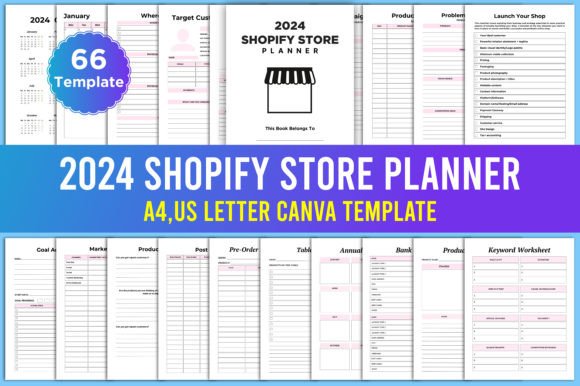
Editable 2024 Shopify Store Planner
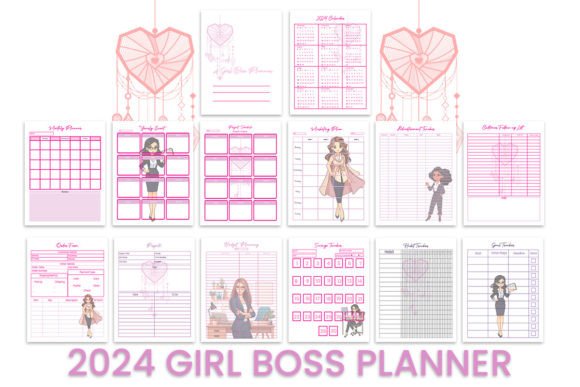
Running a Shopify store — or any small product-based business — means juggling dozens of moving parts every single month. You’ve got product research, inventory counts, marketing campaigns, order tracking, and launch dates all swirling around at once. The Editable 2024 Shopify Store Planner steps into that chaos and gives you a single, visual, and incredibly flexible place to see your whole year. It’s not just a digital file you glance at once; it’s a hands-on workbook designed to be printed, written on, and truly used. And because it’s built inside Canva, you can rearrange every page, change colors to match your brand, and even add your logo before sending it off to a printer.
What you receive is a set of high-quality print-ready PDF files and JPEG files, along with editable Canva links that keep the original design safe. The important thing to remember: open the link, go to your Canva home, and make a copy in your own account. Work on that copy so the original link stays intact forever. That small habit saves a lot of headaches down the road.
Why Paper Still Wins for E-Commerce Planning
Most of us live on screens all day — managing products, replying to customers, scheduling social media. Switching to a physical planner might feel almost retro, but that’s exactly why it works so well. Writing down your monthly goals, target customer profiles, and release dates by hand slows your brain down just enough to catch gaps you’d scroll past. The Editable 2024 Shopify Store Planner blends the best of both worlds: digital customization with tangible, paper planning. You can fill the pages with color, highlight critical pre-launch costs, and always have your Sales Map visible without opening another tab.
Seeing the Whole Year in One Place
The planner includes a 2024 calendar and a month-by-month breakdown from January to December. Instead of treating every month as a separate sprint, you start noticing patterns. Which months tend to be heavier on product updates? When do you typically run campaigns? With pages like the Annual Overview and Countdown to Market, you can map out seasonal launches or restocks far in advance. This isn’t theoretical — if you’re planning a holiday line, you can physically circle the date back in August and then work backward through the Goal Action Plan pages to assign tasks each month.
Small-batch makers often need to know exactly when supplies run low. The Spending Log and Supplies checklist let you tie those inventory moments directly to calendar months, so you’re never mid-launch realizing you’re out of packaging. The planner turns time into a resource you can actually see and touch.
Pre-Launch and Product Research Made Tangible
Before you ever hit publish, there’s a quiet, messy phase full of Product Research, Problem-Solution mapping, and pricing decisions. The planner dedicates whole sections to this vulnerable work. The Product SEO Checklist isn’t buried in a spreadsheet; it’s right beside your Product Ideas page, gently reminding you to think about search terms while you’re still dreaming up the product itself. That proximity matters. You’re more likely to fill in details about target keywords when they sit next to the creative spark.
For someone launching their very first store, the Bank Account and Pre-launch Costs pages remove the financial fog. You can list everything you need to pay for — domain, samples, packaging — and compare it against your budget in plain sight. The Sales Map then asks you to physically outline where your customers are, whether that means local markets, Etsy cross-promotion, or direct traffic. Suddenly, the launch feels less like a gamble and more like a series of small, manageable steps.
Managing Market Stalls and In-Person Selling
Many Shopify store owners also sell at weekend markets, craft fairs, or pop-ups. The planner steps into that world seamlessly with pages like Stall Display Inventory, Table Layout, and Show Products Research. You can sketch a quick booth diagram, list exactly what products you’re bringing, and track how much inventory you start and end with. After the event, the Order Tracker and Income Tracker help you separate in-person sales from online revenue, so you actually know which channel performs better.
The Waiting List Sign Up and Pre-Order Sign Up Sheet are clutch for markets. When someone stops by and you’re sold out of a popular scent or color, you hand them a physical sheet on a clipboard. That sheet lives in the planner, so back home you transfer the emails to your newsletter list without losing a single lead. It’s a small workflow that builds real customer relationships over time.
Marketing That Feels Connected, Not Scattered
A marketing plan works best when it lives alongside your product calendar, not in a separate app. The planner’s Campaign Manager, Advertising Tracker, and Post Planner pages sit right between your Monthly Planner and your Income Tracker. This arrangement means you can see at a glance: “This month I’m promoting the new candle line, these are the three posts I’ve scheduled, and here’s how much I’m spending on ads.” The feedback loop is immediate.
The Newsletter Subscribers log encourages you to note down not just email counts but themes and open rates if you choose. The Product Updates page gives you a spot to plan those “back in stock” announcements or small improvements. All of it together prevents the common trap of marketing yourself without remembering why or for what product. You’re always marketing the right thing at the right time.
Customizing the Planner in Canva So It Truly Fits Your Business
One of the quiet strengths of the Editable 2024 Shopify Store Planner is that you’re never stuck with someone else’s layout. Using a free Canva account, you can swap out colors, add your logo, or duplicate the Spending Log page if your business carries more expense categories than average. Maybe you want to rename “Target Customer Market” to “Client Persona” or add extra rows to the Stocks Inventory page. All of that is possible without starting from scratch.
The practical side of this matters. A vintage clothing seller might combine the Price List and Product Planner pages into a single spread, while a digital product creator may delete the Packaging Inventory page entirely and replace it with a digital delivery checklist. Because the editable links lead to a full Canva template, you can save multiple versions: one for your Etsy shop planning, another for your Shopify store, or even a personal version for goal tracking outside of work.
Tackling Inventory Without Spreadsheet Overwhelm
Inventory can feel soul-crushing when it’s just endless rows in a spreadsheet. The planner introduces a calmer approach with dedicated Stocks Inventory and To Order pages. Physically writing down what you have, what’s low, and what needs to be reordered invites a slower, more intentional review. For handmade businesses, the Supplies section pairs directly with the Shopping List, so you’re not just tracking finished products but also the raw materials that make them. That connection often prevents last-minute panic buys right before a big restock.
The Order Tracker and Income Tracker then close the loop. You can log orders as they come in, note any special requests, and watch how income aligns with the campaigns you planned. Over time, flipping back through the months shows you which products genuinely earn their keep and which ones quietly drain storage space.
What to Consider Before You Dive In
This planner is deep, which is mostly a gift, but it can feel like a lot if you try to fill out every single page right away. The best approach is to start with the essentials: the 2024 Calendar, the Monthly Planner for the current month, and the Goal Action Plan. Add more sheets as your business rhythms become clearer. Some users may find that certain pages — like the Table Layout or Show Products Research — only get used a few times a year, and that’s perfectly fine. The point is having them available when you need them, not forcing yourself into a rigid system.
Print quality matters too. Because you get high-quality PDF and JPEG files, you’ll want to print on slightly thicker paper if you plan to use pens or markers. Many people print the whole thing and bind it, while others keep the digital file on a tablet for on-the-go editing and print only the pages they need for a market day. There’s no wrong method, only the method that fits your actual daily life.
Another honest note: the planner works best when you marry digital and physical habits. If you’re a person who absolutely hates writing by hand, you can still type directly into the Canva template and keep it 100% digital, but you lose some of the reflective slowness that makes paper planning so effective. Try a hybrid first — type the static info, handwrite the weekly updates — and see what feels most natural.
Real-World Examples Across Different Industries
A ceramicist might use the planner to track glaze supplies, plan market display layouts, and note which Instagram posts drove the most pre-orders. A digital template seller could skip the Stall Display Inventory entirely and instead use the Product SEO Checklist and Campaign Manager to schedule Etsy and Pinterest content around seasonal trends. A boutique owner with both an online store and a small physical shop will live in the Stocks Inventory and Waiting List Sign Up pages, making sure the in-store customers never feel left out when an item is available online first. The beauty of the Editable 2024 Shopify Store Planner is that it’s not locked into one industry; it’s a skeleton that takes on the shape of whatever you’re building.
Even service-based businesses dipping into product sales can benefit. A yoga teacher selling branded mats can use the Target Customer Market page to clarify who is actually buying: is it students looking for grip, or fellow teachers looking for bulk orders? That clarity then feeds directly into the Marketing Plan, which feeds into the Income Tracker, and suddenly the side project has a backbone.
Making the Most of the Canva Interior
The editable Canva interior is more than a design perk; it’s an invitation to make the planner so personal that you actually want to open it every day. Change the font to one that feels like your brand. Drop in photos of your products right onto the Product Planner page so you’re visually reminded of what you’re promoting. If you have a team, create a shared Canva link and color-code sections for different responsibilities — one person manages the Post Planner, another the Order Tracker.
Since Canva works in a browser, you can access your planner from anywhere. But the crucial step remains: always make a copy in your own account first. That way, you can edit fearlessly, revert if needed, and still have the pristine original sitting safely in your Canva home.
Moving Through the Year With Less Guesswork
Ultimately, the Editable 2024 Shopify Store Planner is about reducing the cognitive load of running a product business. Instead of remembering release dates, pre-launch costs, or which supplier needs a reorder this week, you simply flip to the relevant page and see the answer you already wrote down. The combination of print-ready PDFs and editable Canva files means you’re not trapped in a single format. You can go fully physical, stay mostly digital, or pivot as the seasons change. The planning system flexes around you, not the other way around, and that flexibility alone can make the difference between a year that feels reactive and a year that feels quietly, confidently purposeful.