Evaluating the 2024 Monthly Student Planner for KDP Publishers and Everyday Organizing
For entrepreneurs building a low or mid-content publishing business, the interior files you choose create the foundation of your product line. The 2024 Monthly Student Planner represents one approach to streamlining your workflow — a ready-made, tested KDP interior that can be uploaded and sold with minimal adjustments. At the same time, individuals shopping for their own academic or personal scheduling tools may encounter this planner design among dozens of similar options online. This guide walks through what sets this particular planner apart, how it compares with alternatives you might consider, and when it makes sense as either a business asset or a personal productivity tool.
What Exactly Is This Planner, and Why Its Format Matters
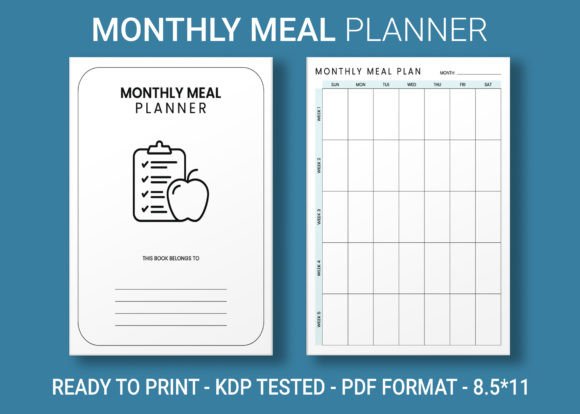
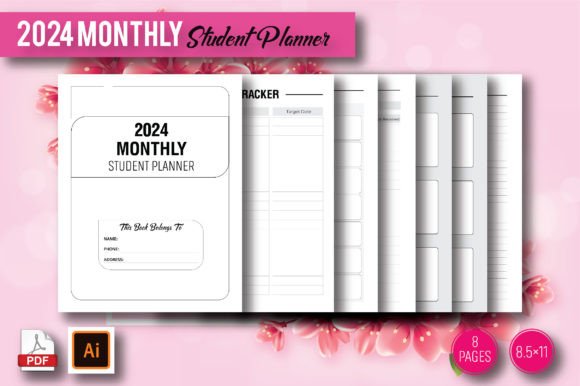
At its core, this product is a downloadable set of files — JPEG, PDF, and editable Adobe Illustrator formats — built to the common 8.5×11 inch print dimensions Amazon KDP favors. Rather than a full 12-month week-by-week breakdown, it contains 8 pages structured around a monthly overview, a format often sought by students who need a high-level glance at deadlines without the granularity of weekly spreads. The absence of bleed simplifies printing for the end user and reduces formatting headaches for the publisher.
The term “100 formatting and thorough testing” signals that the interior has been adjusted to avoid common KDP rejection triggers — margin inconsistencies, font embedding issues, or transparencies that cause processing errors. For someone with limited design experience, this pre-validated quality can be a significant time-saver. The editable AI files further allow you to tweak colors, add a school logo, or adjust fonts without starting from scratch, which sits in the middle ground between buying a flat, uneditable PDF template and commissioning a custom illustrator.
How a Monthly-Focused Layout Compares with Other Planner Styles
Most student planners on the market lean heavily into weekly spreads, daily breakdowns, or even hourly scheduling. The 2024 Monthly Student Planner takes a narrower approach. This difference affects who will find it genuinely useful:
- Weekly planners allocate double-page spreads to each week, often with subject columns or habit trackers. They work well for teenagers tracking multiple assignments per day but can feel overwhelming for a college student who only needs to note major exam dates and project due dates.
- Daily planners dedicate an entire page to a single day, which suits detailed time-blocking but consumes massive page counts and makes a planner bulky. For a student, carrying a heavy book can be impractical.
- Monthly-only planners like this 8-page interior offer a bird’s-eye view. They help with long-range planning but lack space for daily task lists. Students often pair them with a digital to-do app or a simple notebook.
- Undated planners allow any year to be inserted, which appeals to publishers because the same interior can be sold indefinitely. A year-specific planner like this one, tied to 2024, has built-in urgency but also a freshness that undated templates sometimes lack — customers know the dates are correct without manual filling.
When you compare this to similar KDP interiors, you’ll notice that many monthly planners stretch to 12 months (24 or more pages). Here, the 8-page count suggests a condensed version, possibly covering two semesters or a single term. For a publisher, this shortness can be both a tradeoff and a niche opportunity: it may not replace a full academic year planner, but it can be positioned as a semester-at-a-glance insert or a lightweight summer planning tool.
Strengths That Make This Interior Stand Out for KDP Businesses
The 2024 Monthly Student Planner brings several practical advantages that experienced low-content publishers recognize immediately. The 8.5×11 inch size matches Amazon’s most popular trim, keeping printing costs predictable and royalty calculations straightforward. File delivery in three formats — JPEG, PDF, and editable AI — reduces dependency on a single editing program. You can use the PDF as-is for immediate uploading, open the AI file in Illustrator to rebrand elements, or even customize in free tools like Inkscape if you export from the JPEG layer.
Another strength is the claim of “100 formatting and thorough testing.” While new publishers may not fully grasp what this entails, it typically means that the creator has checked for:
- Consistent margins that leave room for hole punching if a student wants to place pages in a binder.
- Font choices that won’t get flagged as unlicensed embedded fonts by KDP’s review system.
- No transparent elements or RGB color modes that might cause printing artifacts.
- Table and line alignment that won’t shift when opened in different PDF viewers.
This level of pre-press quality matters because fixable but annoying errors can delay your product listing or generate negative reviews. Having those steps already done shifts the value proposition from “pretty design” to “reliable product asset.”
Limitations and When Another Type of Planner Might Serve You Better
No single layout fits every need, and clarity about the limitations of the 2024 Monthly Student Planner helps you decide whether it matches your goals, either as a seller or a user.
For KDP Publishers
The 8-page count positions this as a very thin book. Amazon’s minimum page requirement for KDP paperbacks is only 24 pages for a reason — customers often perceive extremely short books as low value. If you upload this interior as a standalone paperback, you could face criticism about the price-per-page ratio. However, if you combine it with additional note pages, resource pages, or a weekly section sourced from another interior, you can build a more substantial product. As-is, the interior works better as a printable download sold via other platforms like Etsy, or as part of a bundle.
The year specificity also means the interior has a shelf life. After August or September 2024 (depending on academic calendars), the relevance declines steeply. Smart publishers may repurpose the editable AI file to update dates for 2025 and beyond, but that requires design skill and time. If you want a set-and-forget listing, an undated monthly template with the same aesthetic might be a stronger long-term play.
For Personal Use
Students who thrive on detailed daily task lists or who need to track hourly study sessions may find the monthly-only structure too sparse. The layout likely provides a clean grid for each month, but limited space for adding class times, professor office hours, or supplementary notes. If you’re a student balancing work, internships, and coursework, the planner serves better as a supplementary overview rather than the primary organization hub. Pairing it with digital calendar reminders or a separate daily scratchpad often yields a more functional system.
Additionally, the 8-page count suggests that either only certain months are included (perhaps a 4-month term) or that multiple months are compressed onto fewer pages. A buyer expecting a full January-to-December layout on 8 pages might be surprised by double-sided printing or combination formats. The product description should clearly state what months are covered to set accurate expectations.
Customization Possibilities and How They Affect Your Decision
The editable Adobe Illustrator files open up customization pathways that static PDFs cannot offer. For a KDP publisher, this means you can:
- Adapt the planner for a specific school or niche. Change the cover page or header to “University of X 2024 Planner” or “Nursing Student Semester Planner.” Small branding shifts can help your product stand out in a crowded search results page.
- Extend the page count. Duplicate interior pages, add lined note sections, a goals page, or a grade tracker. With the basic monthly layout already provided, you can build a more complete 40+ page interior that exceeds Amazon’s minimum threshold and improves perceived value.
- Recolor and restyle. Brighten the design for a younger audience, use muted tones for a professional look, or align the aesthetic with a trending palette you’ve noticed in bestseller lists.
- Create a wire-o or spiral-bound compatible version. Adjust margins slightly for binding holes, then sell a “printable” version that customers can take to a local print shop.
If you lack the software or time to edit AI files, the ready-to-upload PDF still gives you a fast path to market. The key decision is whether you value launch speed over differentiation. A completely unedited interior risks blending into dozens of similar monthly planners on Amazon, but for a publisher who runs a volume model — uploading many interiors quickly to capture niches — it can be an efficient piece of inventory.
Who Benefits Most from This Specific Planner Style?
Through a practical lens, the ideal scenarios for using this interior often involve a clear match between the planner’s structure and the user’s actual planning behavior. Realistic examples include:
Example 1: The College Student with Semesters. A sophomore working on a 16-week semester system might use this planner to map out mid-term dates, finals, and large project deadlines across four months. Because the daily load varies, they supplement with a small pocket notebook for daily tasks. The monthly view keeps them from missing major dates, and the 8-page limit keeps the planner lightweight enough to slip into a binder.
Example 2: The KDP Publisher Testing the Market. Someone new to low-content publishing wants to test demand for student planners without investing in a custom design. They purchase this interior, add 20 blank lined pages at the end for notes, create a simple cover in Canva, and publish at a competitive price. The low upfront cost and quick turnaround let them gather initial sales data and reviews before deciding whether to develop a more extensive planner for the next academic year.
Example 3: The Parent Planning for a High Schooler. A parent wants a visual calendar to hang on the fridge or pinboard, tracking their teen’s tests, sports events, and application deadlines. The 8.5×11 inch size printed on cardstock from the PDF works well as a wall planner. The student keeps a phone calendar for daily alerts, but the family uses the printed monthly pages for coordination.
In each case, the planner isn’t trying to be an all-in-one solution. It succeeds because its constraints — short length, monthly focus, printable format — align with the specific context.
Decision Factors for Purchasing as a KDP Resource
If you’re evaluating this interior for your publishing business, a few concrete factors can guide your decision more than surface-level appeal. Consider:
- Your existing product lineup. Does your catalog lack a monthly student planner, or do you already have several similar designs? Adding this fills a gap only if you can differentiate it through cover design, title, or bundled extras.
- Time versus budget. Hiring a designer for a custom monthly interior can cost anywhere from $50 to $300 depending on complexity. The time saved by buying a tested file may outweigh the purchase cost, especially if you can upload it the same day.
- Sales window. With 2024-specific dating, the strong selling season runs roughly from late 2023 through early 2024. If you’re reading this in mid-2024, the revenue potential from Amazon may already be winding down. Factoring in the cycle is crucial for a year-dated product.
- Platform fit. Amazon KDP handles thin books differently from marketplaces like Etsy, where downloadable digital files face no minimum page counts. If you primarily sell printables rather than bound paperbacks, this product’s file types align well with Etsy’s digital delivery model.
- Your ability to customize. If you plan to use the editable AI files, verify that you have access to Adobe Illustrator or an equivalent vector editing program. The JPEG and PDF alone won’t unlock changes beyond adding an overlay, so your editing comfort level directly influences how much value you extract.
Comparing with Generic, Undated, or DIY Planner Approaches
When you step back and view the broader landscape of planner creation methods, the 2024 Monthly Student Planner occupies a middle ground. On one end, you have truly generic interiors — often poorly formatted, with uneven spacing and default fonts — that cost little but can lead to returns or poor reviews. On the other end, you have fully custom planner creation from scratch, which gives you complete control but requires significant time, software proficiency, and testing.
Between these poles, this interior offers a compromise: professional formatting that has undergone testing, enough flexibility to brand as your own, and enough specificity (year, audience) to target a search query with buyer intent. It won’t solve every problem for every publisher, but it can reduce the friction that stops someone from launching a first or next product.
For personal users, the comparison is similar. You could create your own monthly calendar in Excel or Google Sheets for free, print it, and achieve nearly the same functionality. The value of purchasing a pre-made PDF or printed version comes down to aesthetics, time saved, and the pleasure of a polished layout. If you’re someone who appreciates a clean, professional appearance without tinkering with spreadsheet formatting, the tradeoff may be worth it.
Making an Informed Choice Without Overlooking Practical Realities
Whether you’re a publisher adding to your KDP portfolio or a student hunting for the right organizational tool, the decision hinges on how well the planner’s characteristics match your real-world usage. The 2024 dating creates urgency and relevance; the 8-page count keeps the product simple and lightweight; the monthly focus serves overview planning; and the editable files invite adaptation. None of these are universally “better” — they are specific tradeoffs that will either align with your needs or point you toward an alternative.
For publishers, a prudent next step involves downloading the interior (if available in a trial or via purchase), running a test print at home, and assessing whether any adjustments are needed before uploading to KDP. For students and parents, printing a single month from the PDF and using it alongside existing tools for a week provides a low-risk trial of the format. In both cases, experiencing the planner in its physical form reveals things a digital preview cannot — paper texture, writing space comfort, and visual clarity — that ultimately determine satisfaction and success.